
Repair Booking Agent
Books repairs at any hour and sends emergencies straight to Dispatch.
 Agentforce
 Service Cloud
 Field Service
- Website chat
It writes down what really happened.
The Job Wrap-up Agent turns what your technician says about a job into the job report, the parts used from their van and the customer's email, inside the Salesforce Field Service app. Nothing is saved until they approve it once, and the office sees the job ready to invoice.
Highlights
Spoken in the Field Service app, drafted by the agent1 / 7
The problem
The work is done by early afternoon. The report, the parts and the email to the customer wait until tonight, typed up from memory. By then the details are fuzzy, the van stock is wrong, and the office can't invoice until it arrives.
Tomorrow the office chases it. The invoice waits a day.
See it work
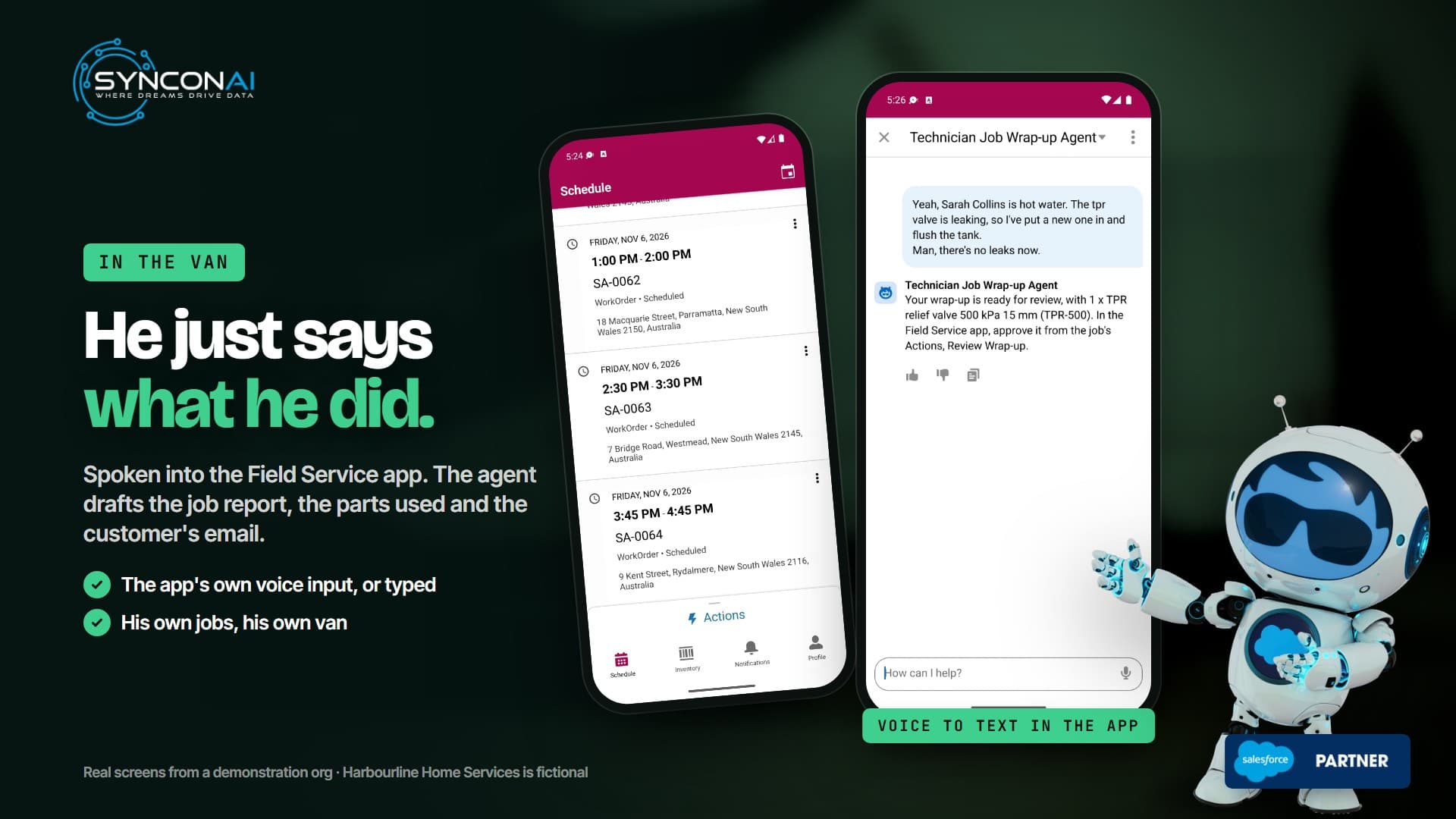
Recorded live in the Salesforce Field Service app, on a demonstration company and a real Salesforce org. Ben's lines were spoken into the app's own voice input; the text is what the phone wrote down, and the replies are the agent's own words from that run, unedited.
Yeah, Sarah Collins is hot water. The tpr valve is leaking, so I've put a new one in and flush the tank. Man, there's no leaks now.
Your wrap-up is ready for review, with 1 x TPR relief valve 500 kPa 15 mm (TPR-500). In the Field Service app, approve it from the job's Actions, Review Wrap-up.
Why it matters. Phone dictation is never perfect ("Sarah Collins is hot water"), and it doesn't need to be: the agent found Sarah's job from her name and the valve on Ben's own van. The draft has his three headings, the part and a plain email.
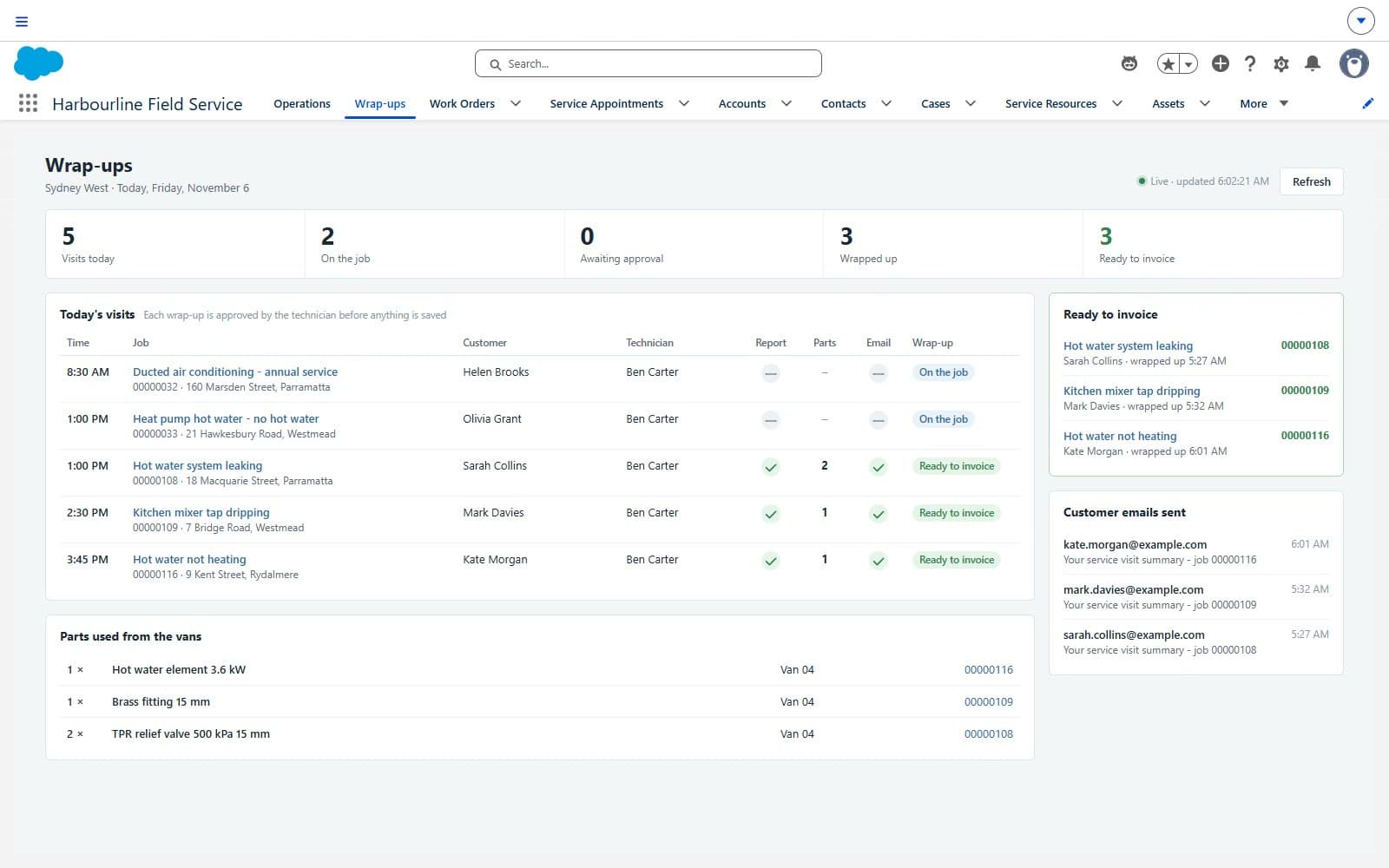
Mark's kitchen tap (a brass fitting from the van) and Kate's hot water (a new element, the thermostat checked) go the same way, each spoken once and approved once. By quarter to four the board shows three jobs wrapped up and three ready to invoice.
The demonstration company is in Sydney, so the agent writes Australian English. That follows your settings.
What the office sees
The office watches the Wrap-ups tab: today's visits, live, in the same layout as the Operations home. Each visit shows its report, parts and email, and turns "Ready to invoice" the moment the technician approves.
Why it's different
| When this happens | A typical job-notes form | The Job Wrap-up Agent |
|---|---|---|
| The technician finishes | Fills fields in the van or at night | Says it once, in plain words |
| Parts used | Picked from a list, or forgotten | Matched to their own van's stock; stock drops on approval |
| "Fixed it." | Accepted as the report | One question: what did you actually do? |
| A detail changes | Edit several fields | "Actually it was two valves": the draft is replaced |
| The customer email | Written separately, or not at all | Drafted from the technician's own words, no prices or phone numbers |
| A hazard on site | A note someone reads later | An urgent safety follow-up for Dispatch, at once |
| What lands in Salesforce | Whatever was typed | Notes, parts consumed, a service report PDF and a sent email, applied once |
Capabilities
Each capability links to its moment in the film.
From what the technician calls it: the customer, the suburb or the kind of job, among their own open jobs.
Named parts are matched to the stock on the technician's own van.
Work performed, findings and recommendations, written only from what they said.
Add a line or correct a quantity, and the draft is replaced.
Review Wrap-up shows exactly what will be saved, then applies it once.
Job notes, parts consumed, a service report PDF and the customer email.
Who it's for
Every job is written up before the van leaves, with parts and the customer told.
Say it in the app they already use, then one tap to approve.
The report, parts, service report and email are on the job, and van stock is right.
An Agentforce Employee Agent, Field Service van stock, Apex actions with an approval step and a conversation test suite.
Built to be trusted
Make it yours
The headings, the parts process, the customer email and your safety procedure.
The agent, its actions, Review Wrap-up in the app, the report branding and the office panel.
Real notes from your jobs, replayed before go-live and before every change.
A pilot with a few technicians, then the whole team, with a runbook and the test set.
How it works
What it handles, the rules it follows and where people use it, as recorded on a real Salesforce org.
What it does, as recorded on a real Salesforce org.
From what the technician calls it: the customer, the suburb or the kind of job, among their own open jobs.
Named parts are matched to the stock on the technician's own van.
Work performed, findings and recommendations, written only from what they said.
Add a line or correct a quantity, and the draft is replaced.
Review Wrap-up shows exactly what will be saved, then applies it once.
Job notes, parts consumed, a service report PDF and the customer email.
Under the hood
The agent decides, approved and tested actions do the work, and Salesforce keeps the record. Built, tested and handed over by us.
Components validated in the last deploy check
Apex tests, all passing
Apex code coverage
Where people reach it
Field Service appWhoField technicians, service and operations managersThe agent
Agentforce Employee AgentJob Wrap-up AgentUnderstands the request and asks only for what is missingApproved actions
Approved and tested8 actions, each with one jobThe only way it can change anythingSalesforce
Agentforce, Salesforce Field Service, the Field Service mobile appYour records, your rules, your audit trailChecked against the agent's last validation on 2026-11-05.
Security
How the agent is kept to its job, and where its work is recorded.
It runs as its own user with permission sets written for this agent, so it can reach only what the job needs.
The agent cannot edit records freely. Every change goes through one of its 8 actions, each with one job.
Every wrap-up is a draft until the technician approves the exact text on Review Wrap-up.
Agentforce runs on the Salesforce platform and its Einstein Trust Layer. Confirm which Trust Layer features apply to agents in your org with your Salesforce account team.
What the agent does lands as normal Salesforce records with their full history, so you can see who changed what and when.
Pricing
A 60-minute call with an architect about the Job Wrap-up Agent and your org, with a written plan you keep.
Before any work starts you get a written proposal with milestones. You approve it, or you do not.
How long it takes depends on your setup and your rules. The proposal states the milestones up front.
Agents can be built and run through one of our monthly delivery plans, alongside your other Salesforce work.
Salesforce licenses, including Agentforce, are bought from Salesforce and are not part of our fee. See our plans and pricing →
Resources
The full film of the agent on a real Salesforce org, with chapters.
Watch the film →What it does, the rules it follows and what you need, on one page you can forward.
Get the brief →For your team or steering group: the problem, what it does, the rules it follows and how we deliver it.
Get the slides →A free 60-minute session on how it would work in your org, with your processes, your data and your rules.
Book a session →Every agent we offer, by business area.
Browse agents →Further reading from our architects
What buyers ask us
Yes. Technicians open Agentforce from the job's Actions and pick the Job Wrap-up Agent. Review Wrap-up is a quick action on the same job.
No. Everything stays a draft until they approve the exact draft. Then it is applied once.
No. It writes only what the technician said, asks when the note is too thin, and allows "fixed" or "complete" in the email only when the technician said so.
Named parts are matched to the technician's own van. On approval they are recorded as used and the stock goes down.
A plain summary from the technician's words. Prices, part codes, phone numbers and addresses are blocked.
Dispatch gets an urgent safety follow-up straight away, and the wrap-up is marked not signed off.
No. Status stays with your team and your process.
It depends on your Field Service setup and your wrap-up rules. We scope it with you on a call.
Client reviews
See how teams describe working with SynconAI, from first scope to production delivery.
Salesforce Select Partner30+ Salesforce certificationsDelivery from Delaware & Sydney, worldwide
Simply Outstanding
“SynconAI Consulting are Simply the Best in the Business When it comes to Salesforce implementation and AI-powered solutions, SynconAI are in a league of their own. Their expertise, dedication, and ability to deliver results that truly move the needle sets them apart from every other consulting partner we've worked with. What they achieved with our Sales Cloud, Service Cloud, and custom Agentforce agent has completely transformed how we operate streamlining our pipelines and our customer service, and automating tasks that used to consume hours of our team's time. They don't just implement technology they transform businesses. If you want the best, you work with their team.”
“I had a very urgent deadline for our project reporting to be delivered and needed to build the module, dashboard and output reports in Salesforce. SynconAI were very responsive - they met with me online, responded to my emails quickly and took calls - whatever was needed to progress the work quickly. We are thrilled with the outcome and will continue to work with SynconAI in the future to continue to build our Salesforce capability and platform.”
“The team at SynconAI were fantastic, and promptly delivered on each project. They were able to guide us through every stage and made sure we were satisfied with the outcomes on multiple scopes of work.”
“They have been great and helping us transform out business by bringing what I conceptualize to life. Great at translating process/workflow needs into a solution. Been a pleasure work with and they're a critical part of our team and will be instrumental into bringing about my vision.”
“Working with SynconAI was a seamless and highly professional experience from start to finish. They took the time to deeply understand our business processes before designing and implementing a Salesforce solution tailored specifically to our operational needs. The team demonstrated strong technical expertise across Salesforce configuration, automation, integrations, reporting, and user experience design.”
More agents
Books repairs at any hour and sends emergencies straight to Dispatch.
AgentforceService CloudField ServiceFinds the part on every van and shelf, and protects the next job.
AgentforceField ServiceTakes a serial number and returns warranty status, entitlement, service history and a suggested next action.
AgentforceService CloudField ServicePaperwork done before the van leaves the driveway.