
Channel sprawl with no model
Thousands of projects, no naming convention, no archive policy. New joiners cannot tell where a decision belongs, so they open another project and the split widens.
Jira integration & consulting · Salesforce, ERP & ITSM · Agentforce · Workflow Builder · enterprise governance
Most organisations already own Jira and have never operated it. The work is the same either way: design the project and workflow model, surface the systems of record, automate the rituals, and set the governance — so the record sits next to the conversation.

Pressure we surface early
Failure modes we surface early: projects created faster than anyone can name them, records updated after the conversation rather than during it, approvals living in DMs, and AI helpers wired to answer questions nobody checked they should be allowed to answer.
Thousands of projects, no naming convention, no archive policy. New joiners cannot tell where a decision belongs, so they open another project and the split widens.
A question in Jira, the answer in the CRM, the approval in email, the ticket in a fourth system. Each hop is a chance for the work to stall or the record to drift.
Deals move in a project and reach Salesforce on Friday, if at all. Forecast reviews then argue about the data instead of the deal.
Discounts, access grants, and exceptions get a thumbs-up in a direct message. Six months later nobody can evidence who approved what, or on what basis.
Retention set to default, external projects opened ad hoc, no DLP and no review of which apps can read which conversations. It surfaces during an audit, not before.
An assistant grounded in a messy site answers confidently from stale threads. The fix is not a better prompt; it is deciding what is canonical first.
Who we design for
A deal room, a case swarm, an incident bridge, and a programme decision log are not the same project with different names. The scoreboards differ too: cycle time, first-contact resolution, mean time to restore, decisions evidenced. Tap a group to pre-scope the conversation form.

Journeys
Sales, service, operations, and IT share one requirement: a working surface with written rules for what stays in Salesforce, the ITSM tool, or the HRIS versus what Jira is allowed to change. We tailor phase-one scope to how your teams actually run, instead of shipping a template that ignores where your work already lives.
SynconAI journey spine for Jira workshops. Agentforce assists inside these stages; it does not make unsupervised commitments on your behalf.
A project per opportunity with the record pinned, stage and amount changes announced, and updates written back from the conversation rather than reconstructed on Friday.
A swarm raised from the Service Cloud console, the right expertise pulled in by skill, and the resolution returned to the case with the SLA clock intact.
The project opens itself from the alert, pages the on-call rota, pins current status, and leaves a timeline the post-incident review can actually read.
Access requests, purchase approvals, and exceptions as forms with routing, reminders, and a recorded approver, replacing the chase and the forwarded thread.
Day-one checklists, provisioning tasks, and a place to ask people questions, with the HRIS staying authoritative for the employee record.
Jira external collaboration projects with scoped membership, retention, and DLP applied, so external work stops happening in personal email and untracked attachments.
Before configuration starts
Jira programmes fail on operating model, not on features. We name the projects, write down which system owns which fact, and set falsifiable pilots before anyone builds a workflow.
Conventions, lifecycles, ownership, and archive rules for every project type, deal, case, incident, project, external. Sprawl is a naming and retirement problem before it is a licensing one.
Which facts live in Salesforce, which in the ITSM tool, which in the HRIS, and what Jira is allowed to write back. Signed by the owners of those systems, not assumed by the integration.
One team, one workflow, a documented before-and-after and a rollback. Expand only when cycle time, resolution time, or approval latency survives scrutiny from the people who own the number.
The first workflow should be one your team already performs badly by hand. Start from a template, make it yours, and let the second one earn its place on evidence from the first.

What we actually build
These are the areas we most often wire with integration contracts and lifecycle clarity before configuration scales. They reflect how COOs, service leads, and IT describe work, not a feature checklist pasted from a product page.
Conventions per project class, joining rules, archive policy, and multi-site design, so the site stays navigable after the first thousand projects.
Sales and Service Cloud in the project with the record pinned, changes announced, and a scoped write-back path so the CRM keeps up with the conversation.
Request forms, routing, reminders, and recorded approvals that replace the DM chase, built so an admin, not a developer, can change them later.
Swarms raised from the console, on-call paging, incident projects that open themselves, and a resolution written back to the case.
Topics scoped to approved sources, answers people can check, and a named human on anything that changes a record or grants access.
Retention by project class, DLP and eDiscovery integration, SSO and SCIM, an app allowlist, and Data 360 grounding where agents depend on governed profiles.
Scope of delivery
From operating-model clarity to run-state operations across Salesforce for Jira, Workflow Builder, Jira external collaboration, Agentforce, Data 360, and MuleSoft, scoped with RACI, integration SLAs, and pilot exit criteria your COO can review.
Jira programmes stall when project ownership, the record boundary, and the approval path stay vague. We scope the rollout with integration SLAs, pilot gates, and change control on one roadmap your steering forum can defend.

Ask-to-approve flows, project taxonomy, and an honest plan check with your account team before the backlog commits.
Naming, lifecycle, membership, and multi-site structure aligned to how your organisation is actually shaped, not to the org chart of two reorganisations ago.
Salesforce, ITSM, HRIS, and finance surfaces via native apps, MuleSoft, or the Jira platform; grounding in Data 360 where your architecture supports it. Adjacent Data 360 programmes when lineage needs hardening.
Access reviews, retention, app approval, and change control so the site stays defensible after go-live, including agent topic ownership.
Role-based enablement for sales, service, operations, and the admins who own configuration, not a single champion who leaves in six months.
Run-state backlog for workflow changes, integrations, and analytics refresh, optionally with managed services.
Governed assistants in the project: triage, knowledge, summary, and drafted actions, scoped with human approval on anything that writes. See Agentforce implementation.
Partnership criteria
Global SIs sell a transformation narrative. Change agencies sell adoption campaigns. SynconAI sells architect-led design of Jira as an operating layer: a project and workflow model that holds, Salesforce surfaces that keep the record honest, automation people actually use, and governance your risk team can defend. Learn more about our Salesforce consulting partner approach.
Salesforce, the ITSM tool, and the HRIS stay authoritative. Jira becomes the surface people work on, with every write-back scoped and owned.
The United States and Australia hubs with shared playbooks for sales, service, operations, and IT rollouts.
Time-boxed pilots with a measurable before-and-after on cycle time, resolution time, or approval latency, not open-ended transformation language.
We tie the backlog to what your site can run today, including Business+, Enterprise+, Jira AI, and Agentforce entitlements.
RACI for project policy, app approval, retention, and agent topic changes that your second line can defend in an audit or board review.
The same architects for backlog, workflow changes, and integration monitoring, not a handoff to a generic queue that never saw discovery.
Reference architecture
CIOs and enterprise architects need one diagram showing where Jira ends and Salesforce, the ITSM tool, the HRIS, and finance begin. We design for Salesforce Well-Architected outcomes, Trusted, Easy, and Adaptable, and document how Salesforce surfaces in Jira, Workflow Builder automation, and Data 360 relate to the repositories that already hold your truth. Every pattern depends on plan, region, and GA status; your account team and the release notes remain authoritative.
SynconAI reference topology for workshops. Aligns with Salesforce Architects diagrams language; plan and region still govern what you can configure.
SynconAI Jira topology
Governed AI
Assistance where the question is asked, not an unsupervised actor
Accounts, cases, tickets, and employee records still live on your data model; Agentforce is how Salesforce surfaces governed assistants on top of them, and Jirabot covers the site-native asks. We redesign the underlying workflow first, then scope agents using topics, actions, and instructions your risk committee can name: request triage, knowledge retrieval, record summarisation, and internal SOP assistance. Anything affecting price, plan, credit, access, or contractual language requires human validation before it commits. Capability availability follows your plan and region. Details on our Agentforce consulting page.
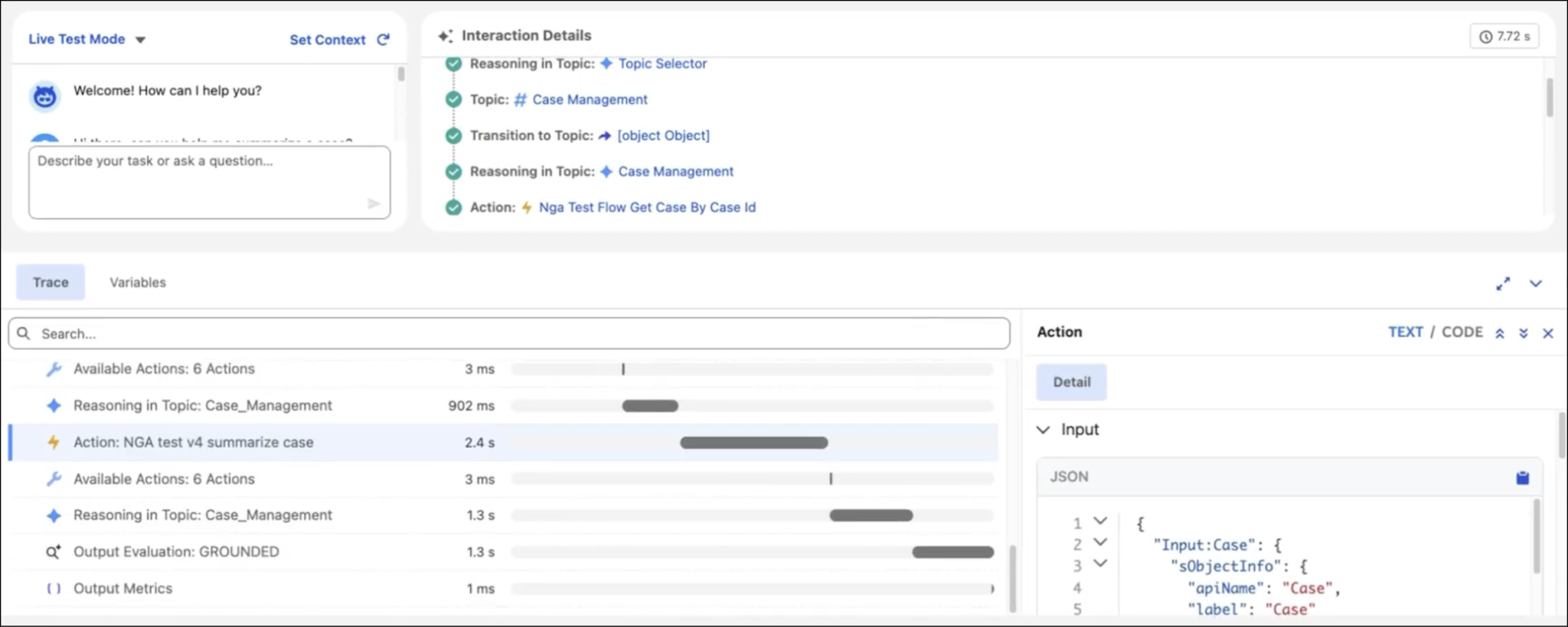
Classify and route inbound requests raised in a project, with topics and actions that never commit access, spend, or price without a named approver.
Retrieve approved policy and SOP content and summarise a long thread or a record for people who need throughput, not archaeology.
Draft the CRM update, the case note, or the status post, then stop at the approval so a person decides what actually reaches the record.
Delivery method
Six beats we repeat on every engagement: transparent gates, no surprise scope, from discovery through operate. Sponsors get a roadmap, a RACI, and pilot exit criteria, not a never-ending slide. Same method as our broader Salesforce consulting practice.
How work moves today, where it stalls, which systems hold what, current site state, and the pilot success measures, with IT, risk, and the business in the room.
Channel model, naming and lifecycle, access and retention policy, integration contracts, and the approval paths, signed off by business and IT before build.
Salesforce surfaces, workflows, and agent topics built in a pilot site with reusable assets your admins can extend after go-live.
Scenario runs with the teams who will live in it, agent evaluation sets, and a proven eDiscovery export before anything reaches the wider site.
Phased by team or business unit; enablement delivered in role; monitoring live; rollback rehearsed with a named owner.
Hypercare, workflow backlog, quarterly access reviews, and agent quality checks. Optionally continue with managed services or ongoing Salesforce administration.

Client reviews
Verbatim reviews from SynconAI Salesforce and Agentforce engagements across the United States, Australia and globally. Anonymised clients are labelled by sector.
Salesforce Select Partner16+ architect certificationsDelivery across USA, Sydney & India
Simply Outstanding
“SynconAI Consulting are Simply the Best in the Business When it comes to Salesforce implementation and AI-powered solutions, SynconAI are in a league of their own. Their expertise, dedication, and ability to deliver results that truly move the needle sets them apart from every other consulting partner we've worked with. What they achieved with our Sales Cloud, Service Cloud, and custom Agentforce agent has completely transformed how we operate streamlining our pipelines and our customer service, and automating tasks that used to consume hours of our team's time. They don't just implement technology they transform businesses. If you want the best, you work with their team.”
“I had a very urgent deadline for our project reporting to be delivered and needed to build the module, dashboard and output reports in Salesforce. SynconAI were very responsive - they met with me online, responded to my emails quickly and took calls - whatever was needed to progress the work quickly. We are thrilled with the outcome and will continue to work with SynconAI in the future to continue to build our Salesforce capability and platform.”
“The team at SynconAI were fantastic, and promptly delivered on each project. They were able to guide us through every stage and made sure we were satisfied with the outcomes on multiple scopes of work.”
“They have been great and helping us transform out business by bringing what I conceptualize to life. Great at translating process/workflow needs into a solution. Been a pleasure work with and they're a critical part of our team and will be instrumental into bringing about my vision.”
“Working with SynconAI was a seamless and highly professional experience from start to finish. They took the time to deeply understand our business processes before designing and implementing a Salesforce solution tailored specifically to our operational needs. The team demonstrated strong technical expertise across Salesforce configuration, automation, integrations, reporting, and user experience design.”
Frequently asked questions
Straight answers about project design, Salesforce surfaces, Workflow Builder, Agentforce, plans, and enterprise governance across the USA and Australia.
Beyond installing it. The work is designing the site and project and workflow model, connecting Jira to Salesforce and the systems around it, automating the approvals and escalations that currently happen manually, setting the AI and security boundaries, and running the adoption work. The configuration is the small part.
Yes, and it goes well past notifications. Salesforce projects turn a project into a working surface for a live record, Sales Cloud and Service Cloud surface their data there, Flow in Jira runs Salesforce automation from the conversation, and updates write back so Salesforce remains the system of record.
Agentforce brings CRM-grounded agents into Jira: packaged for Sales, Service and IT Service, so people can ask questions and trigger actions where the conversation already is. Separately, Jirabot became a personal AI agent in January 2026 on Business+ and Enterprise+. Both operate within the permissions the person already holds.
Yes. Workflow Builder automates without code: steps run in sequence, 70+ connectors take action in other tools, workflows can be triggered from forms, projects, Confluence pages and lists, and a Generate AI Response step can summarise or classify using your own content as the knowledge source.
Enterprise Grid was Jira’s previous name for its top enterprise offering and its multi-site organisation model. Jira’s current plans are Free, Pro, Business+ and Enterprise+, and the enterprise capabilities people associate with Grid: audit logs, native DLP, information barriers, enterprise search and multi-site administration, now sit under Enterprise+. If an existing agreement still references Grid, that is worth checking before any design work.
Yes. Jira has an open platform with a Marketplace of over 2,600 apps, a Real-Time Search API, and an MCP server for agent access, alongside standard APIs for custom integration. The decision that matters is which systems to connect, in which direction, and with what controls.
Jira is a trademark of Atlassian Pty Ltd, registered in the U.S. and in other countries. SynconAI is an independent Salesforce consulting partner; this service is not created by, affiliated with, endorsed by, or supported by Atlassian.
Free architect conversation
60 seconds to brief us. A certified architect replies within one business day.
 Sales Cloud
 Service Cloud
 Field Service
 Experience Cloud
 Marketing Cloud Next
 Revenue Cloud AdvancedSalesforce CPQ
 Data 360
 Financial Services Cloud
 Nonprofit Cloud
 Health Cloud
 CRM Analytics & Einstein
 Agentforce